
logo
logo
  • Solutions & Features
    • Access Control & Entry Management

      Abstract logo: a rounded-square grid with four inner squares and dots, over overlapping circular swirls.

      Gate Pass Management

      Smart Door Unlock

      Self Registration Kiosk / Lobby

      Access Controlled Parking

      Goods Removal and Collections

      Biometric Facial ID Recognition

      Bluetooth Remote-Control

      Touchless Access

      Visitor Access Advanced Booking

      Tenant and Rental Manager

      Resident & Community Management

      Calendar with a user silhouette and a checkmark indicating a confirmed appointment or availability, as a scheduling icon.

      Staff: Time and Attendance

      In-app Store

      Amenity & Facilities Booking

      Critical Alerts

      Data Protection

      Self Registration Kiosk / Lobby

      Digital Voting / Proxy Automation

      Traffic and Speed Enforcement

      Asset Management

      Pet Management

      Events, Documentation & Communication

      Icon of a checklist with a cursor indicating selecting options in a form UI

      Smart Forms & Questionnaires

      Electronic Payments

      Resources and Documents

      Event Registration and RSVP

      Communication Portal

      Smart Device Integration & Features

      Lock icon with circular security rings, indicating password protection and security.

      Passwordless Authentication

      2FA Authentication

      AI Estate Assistant

      Apple CarPlay and Android Auto

      Panic Button / Emergency SOS

      Add to Wallet

      Emergency and Medical Aid Card

      Access Control & Entry Management

      Abstract logo: a rounded-square grid with four inner squares and dots, over overlapping circular swirls.

      Gate Pass Management

      Smart Door Unlock

      Self Registration Kiosk / Lobby

      Access Controlled Parking

      Goods Removal and Collections

      Biometric Facial ID Recognition

      Bluetooth Remote-Control

      Touchless Access

      Visitor Access Advanced Booking

      Tenant and Rental Manager

      Resident & Community Management

      Calendar with a user silhouette and a checkmark indicating a confirmed appointment or availability, as a scheduling icon.

      Staff: Time and Attendance

      In-app Store

      Amenity & Facilities Booking

      Critical Alerts

      Data Protection

      Self Registration Kiosk / Lobby

      Digital Voting / Proxy Automation

      Traffic and Speed Enforcement

      Asset Management

      Pet Management

      Events, Documentation & Communication

      Icon of a checklist with a cursor indicating selecting options in a form UI

      Smart Forms & Questionnaires

      Electronic Payments

      Resources and Documents

      Event Registration and RSVP

      Communication Portal

      Smart Device Integration & Features

      Lock icon with circular security rings, indicating password protection and security.

      Passwordless Authentication

      2FA Authentication

      AI Estate Assistant

      Apple CarPlay and Android Auto

      Panic Button / Emergency SOS

      Add to Wallet

      Emergency and Medical Aid Card

      Request a Consultation
  • Access Control & VMS
    • Guard Application

      Mobile Application software used by the guard to manage visitor access at the gate. This Android application can in theory run on any android…

      Read More ⟶

      Guard Task Capabilities ⟶

      Hardware for Access Control ⟶

      Supported Devices ⟶

      Community Dashboard

      Convenient and Secure Cloud-based Resident Portal

      Your complete management platform from a single login. The community dashboard allows you to manage all aspects of your site: Configure. administer & enrol access tags & remotes. The Community Dashboard changes the way you are able to manage your site.

      Read More ⟶

      Resellers & Partners

      Openitem and the Wyobi team focusses on developing software and custom modules to effectively empower our resellers and application partners.

      The Openitem Application Profile and Showcase Document including all app features, guard control solutions and dashboard functionality

      Read More ⟶

      Download and View the Profile ⟶

      Integrations & Custom

      ⟶ Access Control Integration

      ⟶ Camera Integration

      ⟶ Community Management

      ⟶ Panic and Emergency

      ⟶ Club and Hospitality Integation

      ⟶ Verification

      Request a Consultation
  • About
  • Download
    • Openitem’s Access Control App is a certified with Google, Apple and the Huawei stores. Click on on the links to download the associated version for your mobile device.

      Request a Consultation
  • CONTACT
  • Search

Control iD: Autonomous Entry, Attendance and Occupancy Management

  1. Home
  2. User Settings
  3. Control iD: Autonomous Entry, Attendance and Occupancy Management
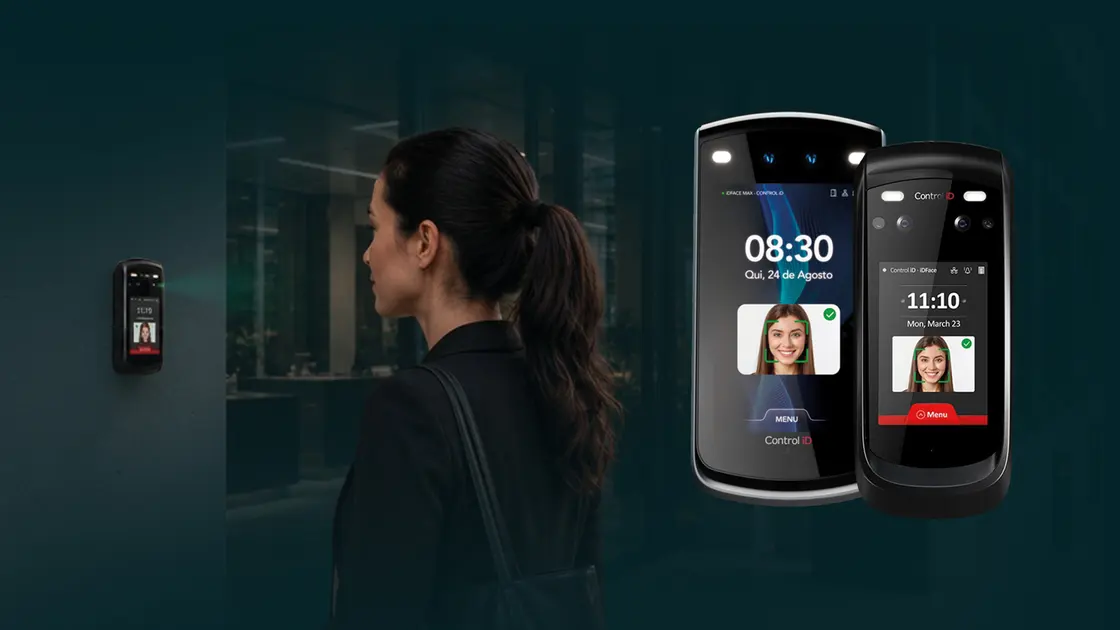
Side view of a woman near a facial-recognition security terminal; two large smartphone-like devices display Face ID enrollment interfaces with a smiling face.

Control ID is a an affordable entry management solution designed for sites that need powerful access control without the complexity of a full traditional installation.

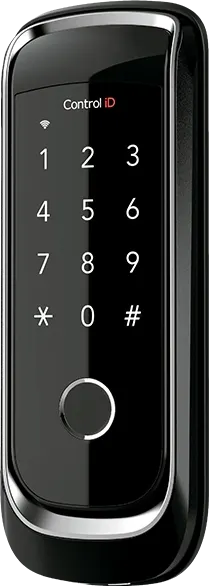
Built around intelligent edge devices and a dedicated dashboard, Control ID gives organisations a modern way to manage people entering and moving through their facilities. It supports facial, QR and card credentials, SIP intercom communication, anti-passback, time and attendance, occupancy monitoring and evacuation support in one simple system.

Control ID can operate independently or integrate with the wider Openitem platform, making it suitable for both new installations and customers who want to extend their existing access control environment. With self-provisioning and support for third-party device acquisition, Control ID gives businesses flexibility, speed and control from day one.

Device Integration

Control ID is built for organisations that want a modern, flexible and intelligent way to manage entry.
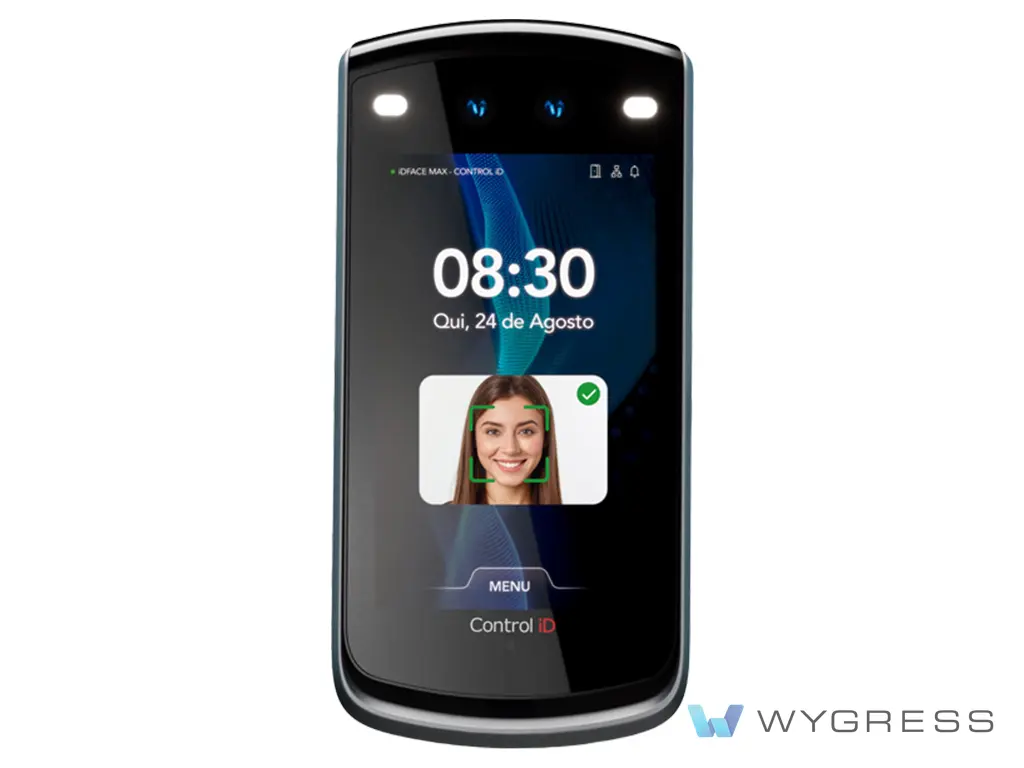
Biometric handheld device with screen showing a face-id scan and a green facial box around a smiling woman’s face.

Control iD Access Control iDFace Max

Its high quality algorithm enables face liveness detection Identification of up…
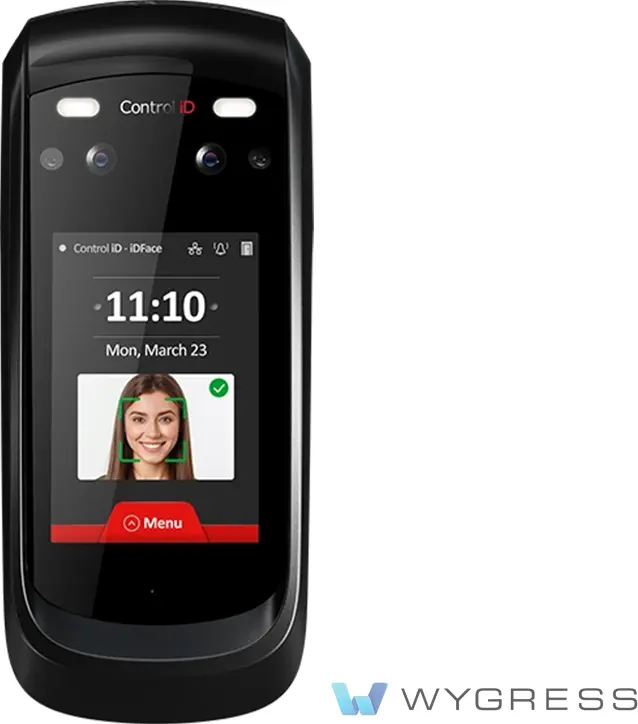
Handheld biometric ID verification device with a touchscreen displaying time, date, and a face scan image on the screen

Control iD Access Control iDFace

Its high quality algorithm enables face liveness detection Identification of up…

Key Features Explained

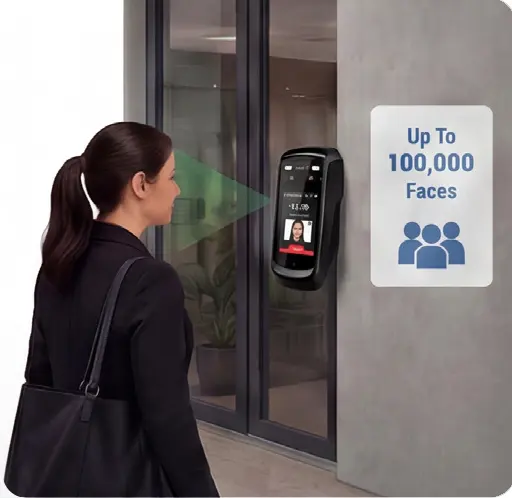
Facial Access up to 100,000 Faces

Control ID supports facial access for up to 100,000 faces, alongside QR and card credentials. Facial access provides a fast, contactless and convenient option for authorised users while reducing reliance on physical credentials where required.
Woman stands at a biometric facial-recognition entry device by a glass door; sign on wall reads 'Up To 100,000 Faces'.
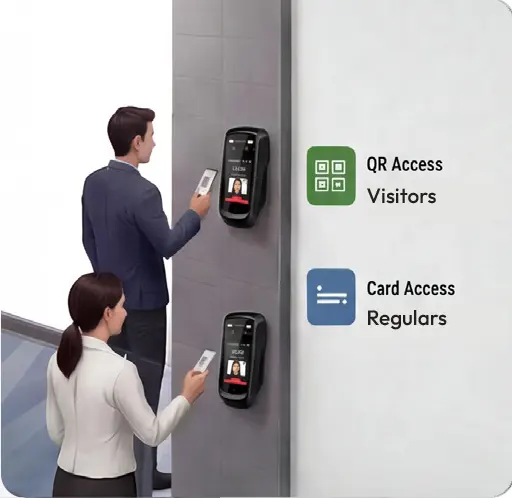
Two people use wall-mounted access panels; signs read 'QR Access Visitors' and 'Card Access Regulars' indicating different entry methods.

QR and Card Access

Control ID supports QR and card-based entry, giving organisations flexibility across staff, visitors, contractors and temporary users.

QR access is ideal for short-term permissions, while card access remains a familiar option for regular users.
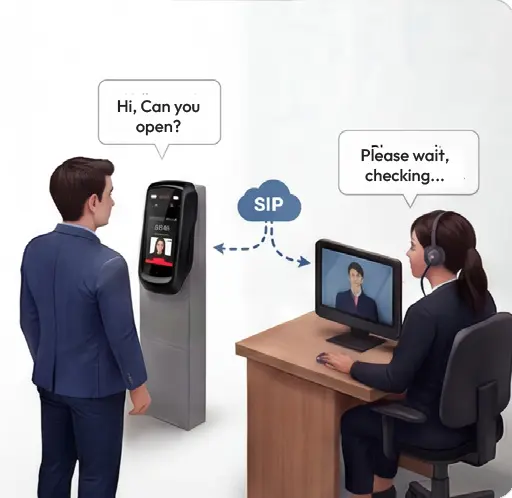
SIP Enabled Intercom

Control ID includes SIP enabled intercom functionality, allowing visitors or users at an entry point to communicate with authorised personnel before access is granted. This is useful for reception areas, gates, service entrances, delivery points and remote entry locations.
Man in a suit uses a self-service access kiosk; a desk agent on video call replies, 'Please wait, checking...,' connected via a SIP cloud.
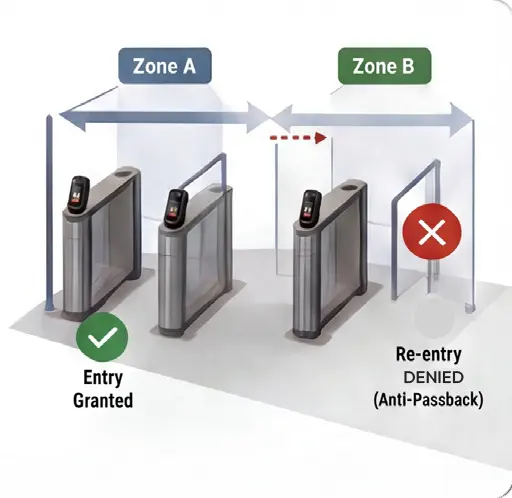
Access control diagram with two turnstiles: Zone A on the left shows Entry Granted, Zone B on the right shows Re-entry Denied (Anti-Passback).

Anti-Passback on Face, QR and Card

Control ID supports anti-passback across facial, QR and card access methods to help prevent credential sharing and repeated unauthorised entry. This improves security, strengthens occupancy accuracy and supports better movement control across zones.
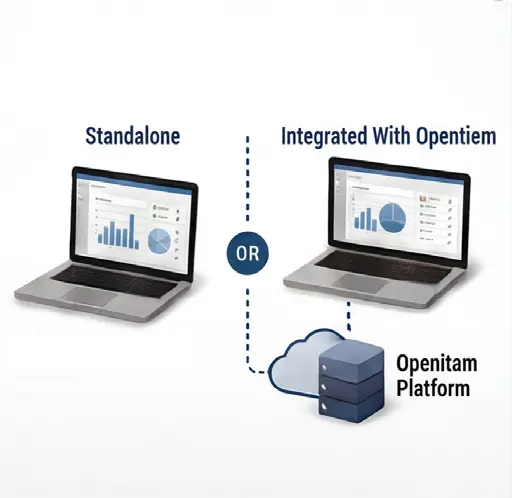
Standalone or Integrated with Openitem

Control ID can operate as a standalone solution with its own dashboard, or integrate with the broader Openitem platform. Customers can deploy it independently for a specific site or connect it into Openitem when broader access control and reporting are required.
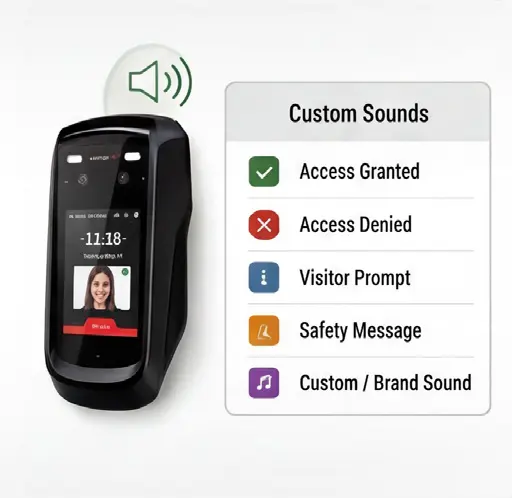
Diagram comparing a standalone laptop analytics interface to the integrated Openitam platform via cloud? (informative)
Handheld access reader showing a Custom Sounds menu: Access Granted, Access Denied, Visitor Prompt, Safety Message, and Custom/Brand Sound.

Custom Sounds

Control ID supports custom sounds for device feedback and user interaction.

Custom audio can be used for access granted, access denied, visitor prompts, safety messages or site-specific instructions.
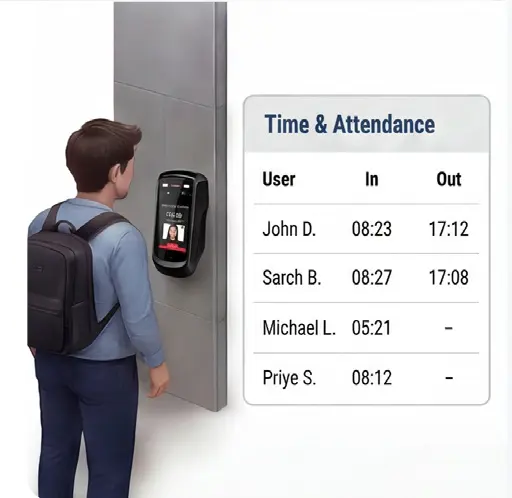
Time and Attendance

Control ID can record user entry and exit activity to support time and attendance tracking.

This provides useful visibility for workforce management, contractor activity and operational reporting.
Student with backpack using wall-mounted time-and-attendance scanner; panel shows Time & Attendance with In/Out times for John D. 08:23-17:12, Sarch B. 08:27-17:08, Michael L. 05:21-, Priye S. 08:12-–
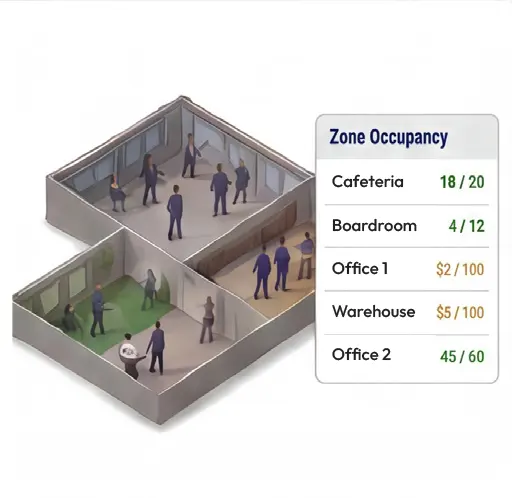
Isometric office layout with a zone-occupancy panel showing current capacity: Cafeteria 18/20, Boardroom 4/12, Office 1 2/100, Warehouse 5/100, Office 2 45/60.

Zone Occupancy

Control ID helps monitor zone occupancy by tracking movement into and out of defined areas.

This gives managers visibility of how many people are present in specific zones, buildings or facilities.
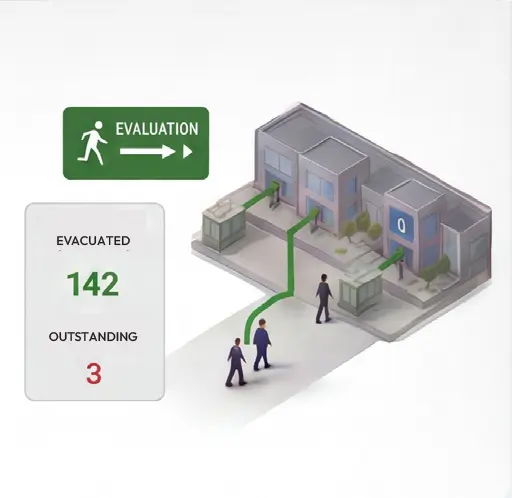
Evacuation Support

Control ID can assist during evacuations by showing who is currently recorded as being on site or within a defined zone.

This supports faster, more informed emergency response and roll-call management.
Isometric evacuation infographic: building with green exit signs; people walking toward the exit along a path; panel shows Evacuated 142, Outstanding 3.
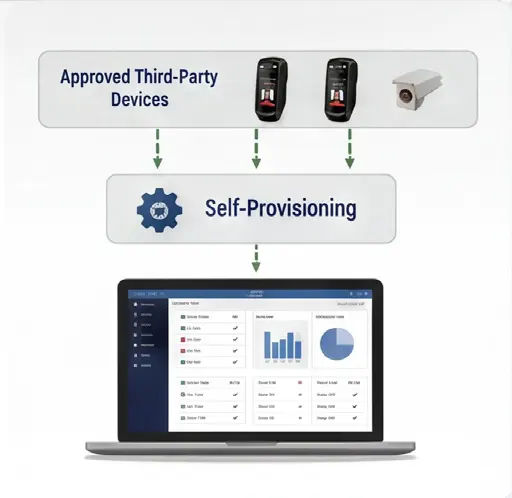
Flow diagram showing three approved devices (two smartphones and a camera) self-provisioning to a laptop dashboard with charts and graphs.

Self-Provisioning and Third-Party Device Acquisition

Control ID supports self-provisioning and flexible device acquisition through approved third-party channels. Customers can acquire compatible devices, provision them into the Control ID environment and manage them through the dashboard.

View/Download Feature Info Sheet
author avatar
admin
See Full Bio
attendance Autonomous Control ID Entry occupancy management.

SEARCH UPDATES

LATEST UPDATES

  • Control iD: Autonomous Entry, Attendance and Occupancy Management July 22, 2026
  • Introducing the New AI Assistant powered by Apple Intelligence June 17, 2026
  • New Mega Menu & Search Function June 5, 2026
  • The OpenItem Profile Wizard April 14, 2026
  • Restricted-Zone Violation November 22, 2025

ARCHIVES

CATEGORIES

  • Payments (6)
  • Data Security (2)
  • Uncategorized (1)
  • Events & Communication (5)
  • User Settings (27)
  • Smart Device Integration and Features (7)
  • Visitor Types (7)
  • Verifications (2)
  • Touch-less & Remote Control (9)
  • Facial ID Recognition (6)
  • Guarded Access Control (33)
  • Estate & Community Management (25)
  • App Updates (12)
  • Partners and Resellers (2)
  • Camera Integration (4)
  • Panic and Emergency (11)
  • Club & Hospitality Integration (12)
  • Access Control & Entry Management (25)
  • Support (3)
  • Introducing the New AI Assistant powered by Apple Intelligence
Client-focused

Join our mailing list now

Stay informed with the latest OpenItem updates, new features, industry insights, and platform enhancements. Join our mailing list to receive important announcements and smart community insights directly to your inbox.

    captcha

    Our specialist team of developers and system architects continuously develops and enhances advanced access control software solutions, ensuring secure, reliable, and convenient community and facility management at all times.

    • Privacy Policy
    • Resident's App
    • Community Dashboard
    • Guard Access
    • Download the App
    • Send us a mail
    • Privacy Policy
    • Resident's App
    • Community Dashboard
    • Guard Access
    • Download the App
    • Send us a mail